Decluttering Checklist
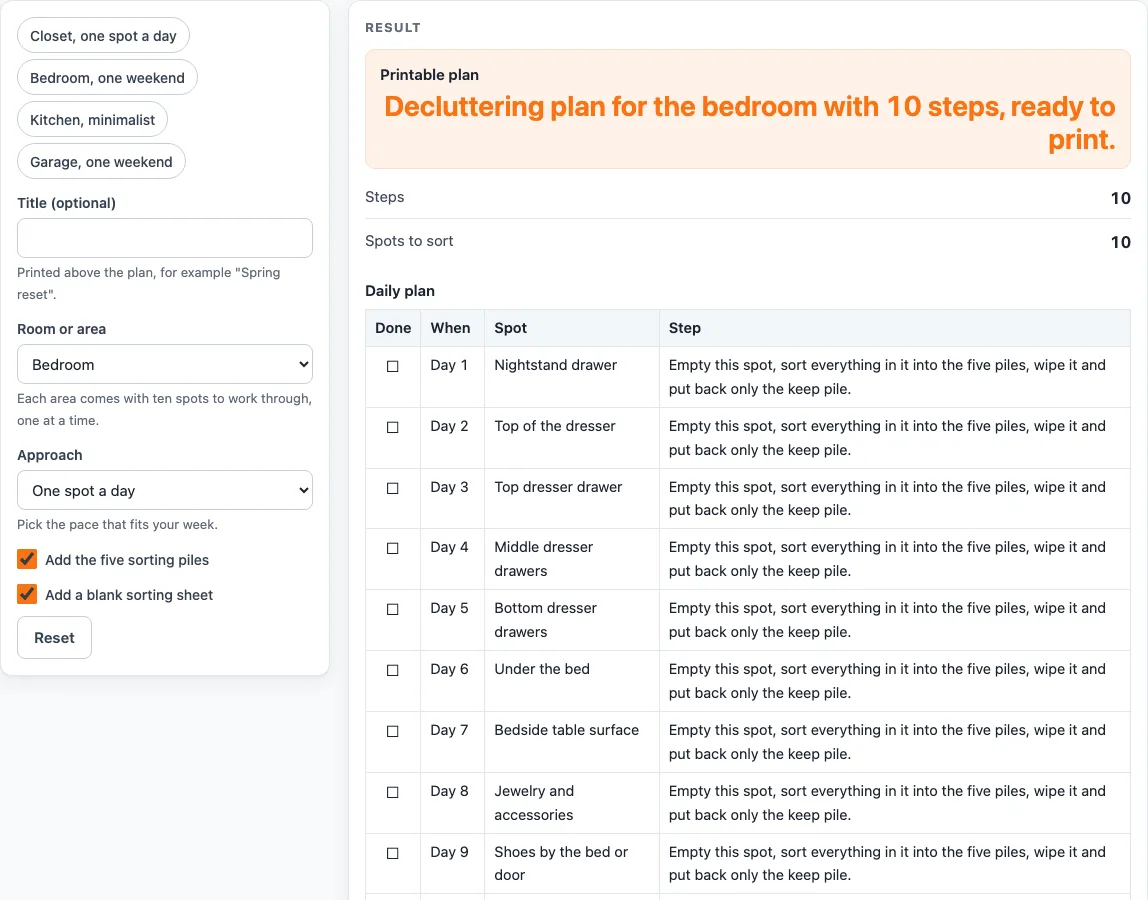
Choose a room and a pace. You get an ordered, printable plan with the spots to clear, five sorting piles and a blank sorting sheet.
Recent
Your last 10 settings, saved only in this browser. Nothing is uploaded.
How to use the Decluttering Checklist
- Type a title in “Title (optional)” if you want one printed above the plan, for example “Spring reset”.
- Under “Room or area”, choose Bedroom, Closet, Kitchen, Bathroom, Living room, Garage or Paper and desk. Each area has exactly 10 spots.
- Under “Approach”, choose a pace:
- “One spot a day” gives a 10-day plan, with one spot named for each day.
- “One weekend” gives 10 steps from Saturday morning to Sunday afternoon, followed by the area’s 10 spots.
- “Minimalist passes” gives 8 steps in three passes (a use test, duplicates and put-back), followed by the 10 spots.
- Tick “Add the five sorting piles” to add Keep, Donate, Sell, Recycle and Trash, each with a one-line rule.
- Tick “Add a blank sorting sheet” to add ten empty rows with the columns Item or area, Keep, Donate, Sell, Recycle and Trash.
- For a quick start, pick a preset: Closet, one spot a day; Bedroom, one weekend; Kitchen, minimalist; or Garage, one weekend.
- Check the tables. The default setup (bedroom, one spot a day, piles and sorting sheet) gives three tables: a 10-row daily plan, 5 piles and 10 blank rows.
- Use “Print / save as PDF” for a paper copy, or “Copy result” to copy the plan text. Every row starts with an empty check box (Done) to tick by hand.
The print view shows plain, bordered tables in black and white, sized for US Letter and A4 portrait. Nothing is saved, so print or copy the plan first.
How to declutter your house one area at a time
Work through one area at a time, and handle each spot the same way. For each spot, empty it, sort everything into five piles, wipe the empty space, and put back only the keep pile. Doing the same steps every time keeps the work simple, and you do not have to invent a new method for each drawer or shelf.
The order of the spots is fixed. The closet list starts with the floor of the closet, the kitchen list starts with the junk drawer, and the garage list starts with the floor and walkway. The lists are our own and are meant as a starting point, so skip a spot that does not apply to you. Each area has ten spots, which keeps the plan the same size whichever pace you pick: a day per spot, a weekend, or a set of passes.
Why sort into five piles when you declutter
The five piles are Keep, Donate, Sell, Recycle and Trash. Each has a one-line rule, so you do not have to decide what a pile means while you are sorting. Keep is for what you use, need or love and that has a place to live. Donate is for items that are clean and working but unused. Sell is for items worth the time to list and meet a buyer; if not, the rule says to move them to donate. Recycle is for paper, glass, metal, plastic and electronics that your local program takes. Trash is for items that are broken, stained, expired or unusable by anyone else.
The donate and recycle rules tell you to check what your local donation center or recycling program accepts. Accepted items differ from place to place, so a quick check before you load the car saves a second trip. The blank sorting sheet gives you ten rows to note an item or area and tick the pile it went to.
The “Minimalist passes” approach works in a different way. Pass 1 asks of each item: have I used this in the past year, does it have a place where it lives, and would I buy it again? Pass 2 removes duplicates and keeps the best one. Pass 3 repeats the spots one by one, ending each with a wiped, tidy shelf. Splitting the work this way lets you make one decision at a time.
These steps are our own method. They do not claim how much you will keep or throw away. The results depend on your items and your choices, so treat the plan as a guide you can change.
Worked examples
| Input | Result |
|---|---|
| Bedroom, One spot a day | 10 steps, 10 spots |
| Closet, One weekend | 10 steps, 10 spots |
| Kitchen, Minimalist passes | 8 steps, 10 spots |
| Garage, One spot a day | 10 steps, 10 spots |
Calculated by the tool above; open it with the same values to see each step.
Frequently asked questions
How do I start to declutter my house when everything feels like too much?
Pick one small area, such as paper and desk, and choose “One spot a day”. You will only handle one spot each day, so the job stays small.
Should I choose One weekend or One spot a day?
Choose “One weekend” if you can give two days in a row to one area. Choose “One spot a day” if you prefer to spread the work over ten days.
What is the difference between Minimalist passes and the other approaches?
“Minimalist passes” gives 8 steps in three passes (a use test, duplicates and put-back) and then lists the 10 spots. “One spot a day” gives a 10-day plan with one spot per day, and “One weekend” gives 10 steps from Saturday morning to Sunday afternoon.
Does this tool save what I type?
No. Nothing is stored or uploaded. The tool runs in your browser and is free to use with no sign-up, so print or copy the plan if you want to keep it.
What should I do with items marked donate or recycle?
Check what your local donation center or recycling program accepts before you take anything out. The rules differ by location, so the check is worth doing first.
Can I use this to declutter my garage or my bedroom?
Yes. Choose Garage or Bedroom under “Room or area”, then pick the pace. The presets “Garage, one weekend” and “Bedroom, one weekend” set a weekend plan. For a slower pace, choose “One spot a day” and the plan names one spot per day over ten days.
Related tools
- First Apartment Checklist: Use it when you are setting up a new home and want a list of what to buy and check.
- House Cleaning Checklist: Use it after you declutter, to clean each room in a set order.
- House Cleaning Schedule: Use it to plan regular cleaning days once your home is sorted.
- Moving Out Checklist: Use it when you are leaving a home and want to sort items before you pack.
- Cleaning and Decluttering: Browse all the cleaning and decluttering tools in one place.
- Storage and Moving: Use it when the items you keep need a box, a shelf or a storage unit.
- Closet Design Tool: Use it when the closet you cleared needs new rods and shelves.