First Apartment Checklist
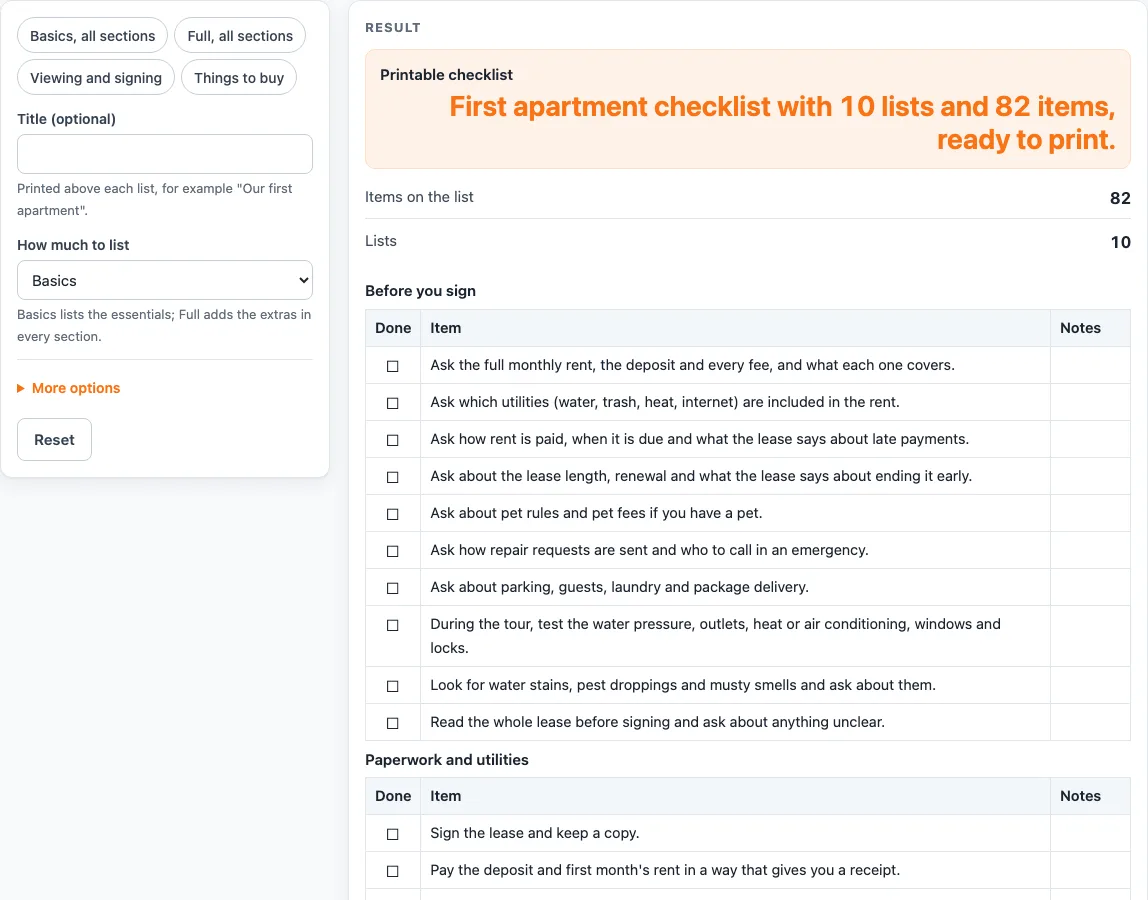
Pick Basics or Full and tick the sections you want. You get a printable list of what to ask, check, set up and buy, with a box in front of every line.
Recent
Your last 10 settings, saved only in this browser. Nothing is uploaded.
How to use the First Apartment Checklist
- Type a name in “Title (optional)” if you want one, A typed title is printed in front of each table heading.
- Under “How much to list”, choose a level. “Basics” lists the essentials in every section. “Full” adds the extra items in each section, and every Basics item is also on the Full list.
- Open “More options” and tick the sections you want from the ten boxes: before you sign, paperwork and utilities, move-in inspection, kitchen, bathroom, bedroom, living area, cleaning supplies, basic tools and first week.
- Or use a preset: “Basics, all sections”, “Full, all sections”, “Viewing and signing” (the first three sections, 28 items on Basics) or “Things to buy” (kitchen to basic tools).
- Check “Items on the list”. With Basics and all ten sections ticked, the list has 82 items. With Full and all ten sections ticked, it has 114.
- If no section is ticked, the page shows “Tick at least one section.” Tick a section to see the tables again.
- Read each table. Every row has an empty box to tick by hand on paper and a notes column for your own comments.
- Press “Print / save as PDF” when the list is ready. The sheet has plain black borders, works in black and white, and suits US Letter or A4 portrait.
Use a preset when you only need one stage, and a title to tell several viewings apart.
What goes on a first apartment checklist?
A first apartment checklist covers the work from the first viewing to the end of the first week. This page splits that work into ten sections, in roughly the order you need them: questions before you sign, paperwork and utilities, the move-in inspection, the rooms, cleaning supplies, basic tools and the first week. Each section becomes a table of items you can tick off.
The “Before you sign” section is a list of questions to ask and things to test during a tour. It covers rent, deposit and fees, which utilities are included, lease length, pet rules, repairs, parking, water pressure, outlets, locks and windows. Asking these questions before you sign means you know the costs and rules you are agreeing to.
The room sections, kitchen, bathroom, bedroom and living area, list the items you may need for each room. The “Things to buy” preset groups the kitchen through to basic tools, which is useful when you are shopping for a new home. The lists give item types only, with no brand names and no shopping recommendations.
Why check an apartment before you move in?
Checking an apartment before you move in gives you a record of its condition at the start of your time there. The move-in inspection section asks you to walk through each room, photograph any existing damage and write it down for the landlord. Doing this early makes it easier to show what was there when you arrived.
The same section asks you to test alarms, faucets, appliances and locks. It also asks you to find the breaker panel and the water shutoff before you need them. Knowing where these are helps you act quickly if something goes wrong in the first week.
The page gives no legal or tenant-rights advice. It only lists things to ask, check and do. For the rules that apply where you live, read your lease and check the local rules.
Basics is the shorter choice for a quick move, and Full adds more items to each section for a more thorough check. Use whichever level suits how much time you have before moving day.
Worked examples
| Input | Result |
|---|---|
| Basics list, 10 sections | 82 items on 10 lists |
| Full list, 10 sections | 114 items on 10 lists |
| Basics list, 3 sections | 28 items on 3 lists |
| Full list, 6 sections | 71 items on 6 lists |
Calculated by the tool above; open it with the same values to see each step.
Frequently asked questions
Is the first apartment checklist free to use?
Yes. It runs in your browser, is free, and needs no sign-up. Nothing you type is stored or uploaded.
What is the difference between Basics and Full?
Basics lists the essentials in every section. Full adds the extra items in each section, and every Basics item is also on the Full list. With all ten sections ticked, Basics gives 82 items and Full gives 114.
Can I use this as an apartment move in checklist?
Yes, the page is built for that. The lists are written for ordinary households, so also check your lease and local rules, since the page gives no legal advice.
Why does the page say “Tick at least one section.”?
That message appears when no section is ticked. Tick at least one section, and the tables for your chosen sections will appear.
Does the list recommend products to buy?
No. The lists have no brand names and no shopping recommendations. They only name item types, such as a saucepan or a can opener.
Can I print the checklist?
Yes. Use the “Print / save as PDF” button. The sheet shows each table with an empty box in every row, plain black borders and a layout that works in black and white, for US Letter or A4 portrait.
Related tools
- Decluttering Checklist: use it before a move to sort what you own and decide what to keep, sell or give away.
- Moving Box Calculator: use it to estimate how many boxes your move needs.
- House Cleaning Checklist: use it when you need a list of cleaning tasks for each room in a home.
- House Cleaning Schedule: use it to plan how often each cleaning task happens across the weeks.
- Moving Out Checklist: use it when you are leaving a home and need a list of tasks for the final days.
- Mattress Size Chart: use it to check bed dimensions before you buy.