House Cleaning Checklist
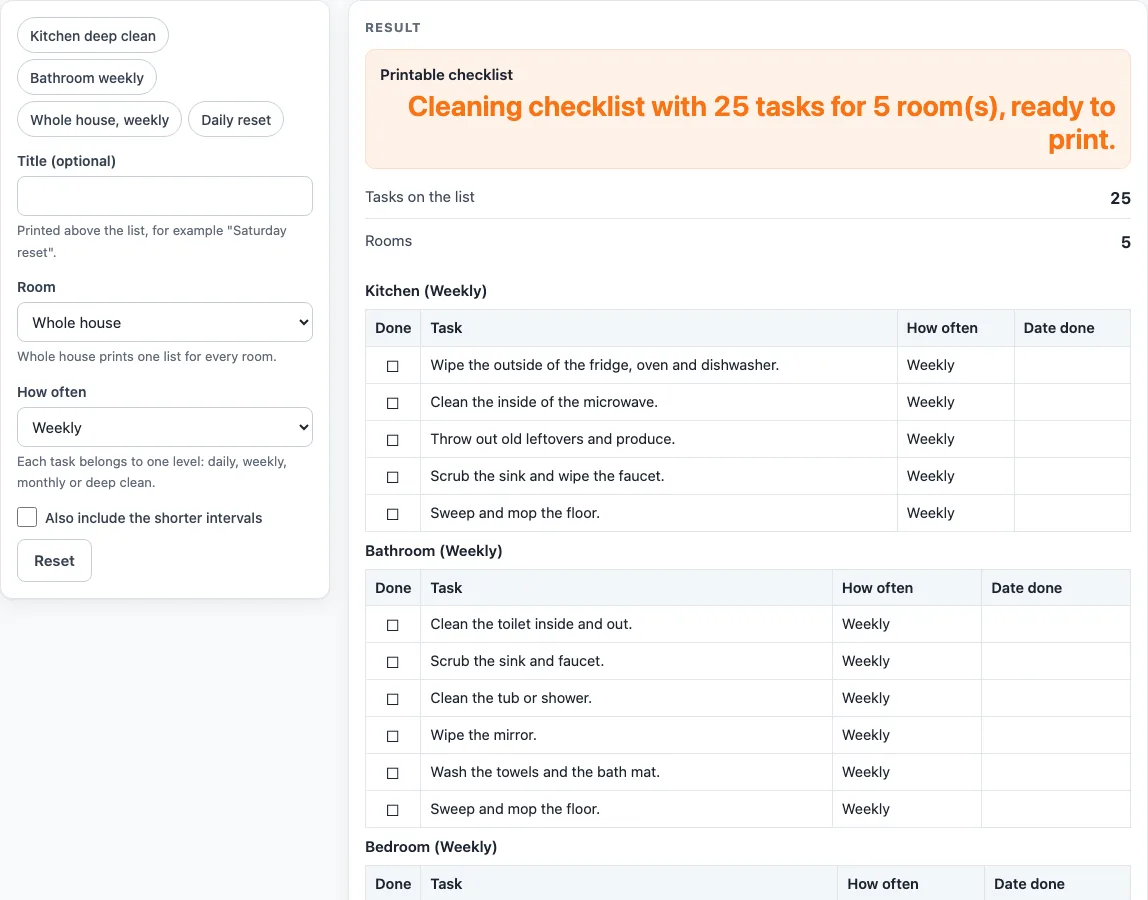
Pick a room and how often you clean. You get a printable checklist with a box in front of every task and a column for the date done.
Recent
Your last 10 settings, saved only in this browser. Nothing is uploaded.
How to use the house cleaning checklist
- Type a title in “Title (optional)” if you want one. A typed title is printed in front of each heading.
- Under “Room”, choose whole house, kitchen, bathroom, bedroom or living room. The default is whole house.
- Under “How often”, choose daily, weekly, monthly or deep clean. The default is weekly.
- Tick “Also include the shorter intervals” if you want the lower levels on the same list. A weekly list then also holds the daily tasks.
- Read “Printable checklist”, “Tasks on the list” and “Rooms”. Each room is its own table with the columns Done, Task, How often and Date done, so a whole house list prints five tables.
- For a quick start, load a preset: Kitchen deep clean, Bathroom weekly, Whole house, weekly or Daily reset.
- Check the task count. A kitchen deep clean gives 5 tasks, and a whole house weekly list gives 25 tasks in five tables (5, 6, 5, 5 and 4).
- Open the print view. It shows plain black-and-white bordered tables with an empty box in each row, and it fits US Letter and A4 portrait paper.
- Print the list, tick each task when it is done and write the date in the “Date done” column.
Printing is the easiest way to use the list on a wall or fridge. Because nothing is saved, change the inputs and print again whenever your routine changes, for example when you want a monthly list after a weekly one.
How does a cleaning checklist sort tasks by how often they are done?
Every task on the page belongs to exactly one level: daily, weekly, monthly or deep clean. Without the shorter-intervals box ticked, the list shows only the tasks at the level you chose. This keeps each printed list focused on the jobs due at that point in your routine.
The box makes the list cumulative. A weekly list then also holds the daily tasks, and a monthly list holds the daily and weekly tasks as well. For example, a bathroom weekly list with the box ticked gives 8 tasks: 2 daily and 6 weekly. A whole house daily list gives 11 tasks, and a whole house deep clean gives 21.
The default list, whole house weekly, shows how the pieces add up. It has five tables of 5, 6, 5, 5 and 4 tasks, which is 25 tasks in total, and each row carries the word Weekly in the “How often” column. Switch to the cumulative list and the same choice also brings in the daily tasks from every table, so the printout grows. Pick the level that matches how you really clean, because a short list that gets ticked is more useful than a long one that hangs unread.
Why do the task counts change between rooms?
Each room has its own set of tasks, so the counts differ. The counts per room for daily, weekly, monthly and deep clean are:
- Kitchen: 3, 5, 4 and 5
- Bathroom: 2, 6, 4 and 4
- Bedroom: 2, 5, 4 and 4
- Living room: 2, 5, 4 and 4
- Whole home: 2, 4, 4 and 4
The whole-home list covers shared jobs such as floors, entry, trash, smoke alarms and filters. These sit outside any single room, so they appear only when you choose the whole house. The monthly smoke alarm line follows the advice of the US Fire Administration to test smoke alarms monthly (usfa.fema.gov).
Where a task depends on a care label or the maker’s manual, the list says so. The kitchen deep clean, for example, starts with cleaning the inside of the oven following the maker’s manual. The dishwasher filter, the washing machine, pillows, comforters and curtains work the same way. The page does not name any cleaning product and makes no health or germ claims.
Worked examples
| Input | Result |
|---|---|
| Whole house, Weekly | 25 tasks in 5 list(s) |
| Kitchen, Deep clean | 5 tasks in 1 list(s) |
| Bathroom, Weekly | 8 tasks in 1 list(s) |
| Whole house, Daily | 11 tasks in 5 list(s) |
Calculated by the tool above; open it with the same values to see each step.
Frequently asked questions
Can I print a weekly cleaning checklist?
Yes. Choose weekly under “How often”, then open the print view. The output is black and white and fits US Letter and A4 portrait.
How do I add daily tasks to a daily or weekly cleaning checklist?
Tick “Also include the shorter intervals”. The weekly list then also holds the daily tasks, so you see both levels on one printout.
Is there a bathroom cleaning checklist?
Yes. Choose bathroom as the room. A weekly bathroom list shows 6 weekly tasks, and adding the shorter intervals brings in 2 daily tasks for 8 in total.
What is in a kitchen deep cleaning checklist?
The kitchen deep clean has 5 tasks. The first is cleaning the inside of the oven, following the maker’s manual. You can load it with the Kitchen deep clean preset.
Does this tool keep what I type?
No. Nothing you type is stored or uploaded. The tool runs in your browser, so when you close the page the list is gone unless you have printed it.
Can I use this as a household chores checklist or template?
Yes. Choose whole house to get all five tables and print the list. The “Date done” column gives you space to record when each job was finished, and you can print a fresh copy whenever you want to reuse it.
Related tools
Browse all cleaning and decluttering tools for more printable lists and planners, or pick one of these. Each one runs in your browser, is free and works without sign-up, so you can try several and print the one that suits your home.
- Decluttering Checklist: use it before a clean when you need to sort and remove items first.
- First Apartment Checklist: use it when you are setting up a new home and want a starting list of tasks.
- House Cleaning Schedule: use it when you want to plan which days each cleaning job falls on.
- Moving Out Checklist: use it when you need a list of tasks to finish before you leave a home.