House Cleaning Schedule
Tick your rooms and the days you can clean. You get a printable plan with daily tasks, weekly tasks spread over your days, a monthly list and a seasonal deep-clean list.
Recent
Your last 10 settings, saved only in this browser. Nothing is uploaded.
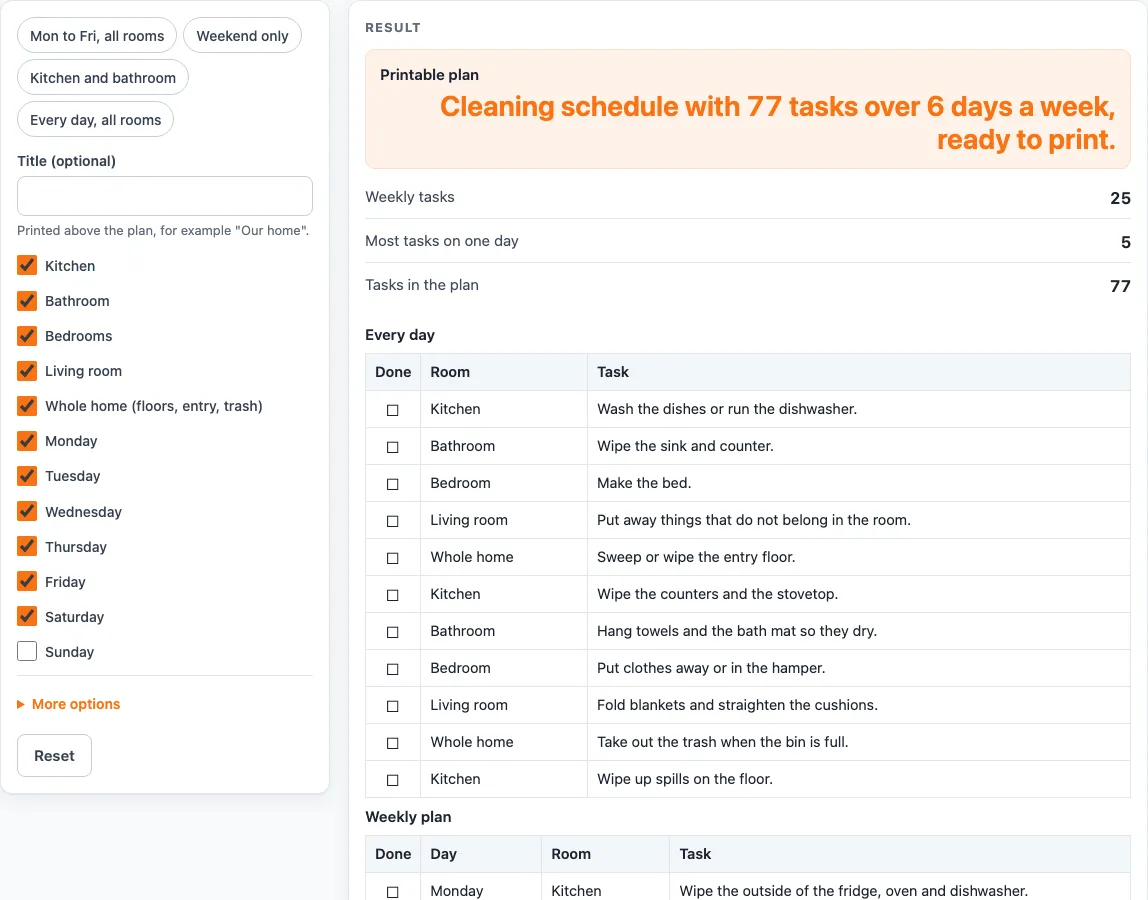
How to use the house cleaning schedule tool
- Type a title in “Title (optional)” if you want one printed above the plan.
- Tick the rooms to include: Kitchen, Bathroom, Bedrooms, Living room and Whole home (floors, entry, trash). At least one room is needed.
- Tick the days you can clean, Monday to Sunday. Monday to Saturday is ticked by default, and at least one day is needed.
- Open “More options” and tick “Add a daily list”, “Add a monthly list” and “Add a seasonal deep-clean list”. All three are on by default.
- Read the results: “Weekly tasks”, “Most tasks on one day” and “Tasks in the plan”.
- Scroll to the “Weekly plan” table. Each row has a Done box, the day, the room and the task, listed by your chosen days in week order.
- Check the other tables you switched on: “Every day”, “Once a month” (by week of the month) and “Deep clean, once a season”.
- Use “Print / save as PDF” for a paper copy. The print view uses plain bordered tables with an empty box in each row, in black and white, and fits US Letter and A4 portrait. “Copy result” copies the plan text.
To save time, pick a preset: “Mon to Fri, all rooms”, “Weekend only”, “Kitchen and bathroom” or “Every day, all rooms”. A preset fills in rooms and days, and you can still change any tick box afterward. Nothing you enter is stored or uploaded.
What is a house cleaning schedule and how is this one built?
A house cleaning schedule is a plan that puts household jobs on set days, so that no single day carries the whole load. This tool builds its plan from fixed task lists for five areas: kitchen, bathroom, bedrooms, living room and whole home (floors, entry, trash). Each area has its own counts of daily, weekly, monthly and deep-clean tasks, so the total depends on which rooms and lists you choose.
With every room, every list and the default Monday to Saturday, the page gives 11 daily tasks, 25 weekly tasks, 20 monthly tasks and 21 deep-clean tasks. That is 77 tasks in total, with at most 5 on any one day. These numbers are calculated from your inputs, so a smaller set of rooms gives a smaller plan, and the same inputs always give the same plan.
Daily tasks are the exception to spreading. They appear as one table of check box, room and task that applies every day, rather than being divided across the week. Monthly tasks go round the four weeks of the month in the same way that weekly tasks go round the days, and deep-clean tasks go round the four seasons: spring, summer, fall and winter. The monthly list includes a smoke alarm test line, which follows the US Fire Administration advice to test smoke alarms monthly.
How are cleaning tasks spread across the days?
Tasks are placed in order room by room: kitchen task 1, bathroom task 1, bedroom task 1 and so on, then task 2 of each room. Task number i then goes to day i modulo the number of chosen days, counting from the first chosen day. Because of this rule, no day gets more than one task more than any other day, which keeps the load even. Weekly tasks are then sorted by the chosen days in week order, so an earlier day always appears above a later one.
Here is a worked example. Choose the kitchen and bathroom only, with Monday and Wednesday. The page gives 11 weekly tasks: 6 on Monday (five kitchen tasks and the bathroom floor) and 5 on Wednesday (bathroom tasks). Change the days and the same rule reassigns every task, so you can test a different pattern before you print.
Worked examples
| Input | Result |
|---|---|
| 5 rooms, 6 days | 25 weekly tasks, at most 5 a day |
| 5 rooms, 2 days | 25 weekly tasks, at most 13 a day |
| 2 rooms, 2 days | 11 weekly tasks, at most 6 a day |
| 5 rooms, 6 days | 25 weekly tasks, at most 5 a day |
Calculated by the tool above; open it with the same values to see each step.
Frequently asked questions
What is a house cleaning schedule?
A house cleaning schedule is a plan that tells you which cleaning jobs to do on which days. It helps you spread the work across the week so that no single day is overloaded.
Is this cleaning planner free to use?
Yes. It runs in your browser, has no sign-up, and nothing you enter is stored or uploaded.
Can I print a cleaning schedule template?
Yes. Use “Print / save as PDF”. The printable plan uses plain bordered tables with an empty box in each row, in black and white, and fits US Letter and A4 portrait. Set the rooms and days first, then print.
Why does the page ask for at least one room or one day?
A plan needs at least one room and one day to spread any tasks. If no room or no day is ticked, the page shows “Tick at least one room” or “Tick at least one day” instead of a plan.
Does the daily list change from day to day?
No. The daily list is one table of check box, room and task that applies every day, so the same tasks apply each day rather than a different set.
Does the page recommend cleaning products?
No. The wording is ours, and the page makes no claims about cleaning products, germs or health. It only lists the tasks and when they fall.
Related tools
- House Cleaning Checklist: use it when you want one plain list of jobs rather than a plan spread over days.
- Decluttering Checklist: use it before a big clear-out, to sort what stays and what goes.
- First Apartment Checklist: use it when you are setting up a new home and need a starting list.
- Moving Out Checklist: use it when you are leaving a home and need the end-of-stay jobs in one place.
- Cleaning and Decluttering: browse all the cleaning and decluttering tools in one place.
- Laundry Room Dimensions: use it when you plan space for the laundry jobs on your schedule.