Moving Box Calculator
Choose your home size to see how many moving boxes published guides suggest, split into small, medium, large and wardrobe boxes. Add rooms or square feet for more estimates.
Recent
Your last 10 settings, saved only in this browser. Nothing is uploaded.
How to use the Moving Box Calculator
- Open the calculator at the top of this page.
- Click one of the presets: “Studio”, “1 bedroom”, “2 bedrooms” or “3 bedrooms”. For any other size, open “Home size” and choose a studio or a number of bedrooms from 1 to 7.
- Read “Total boxes (span of the guides)”. It is the lowest to highest figure across the two bedroom guides.
- Read “Total, guide A” and “Total, guide B” to see where the two guides differ.
- Check the counts for “Small boxes”, “Medium boxes”, “Large boxes” and “Wardrobe boxes”. They do not appear for a studio.
- Under more options, type a whole number from 1 to 40 into “Number of rooms (optional)” if you know how many rooms the home has. It adds “By rooms”.
- If you know the floor area, type a number from 100 to 20,000 into “Living area, sq ft (optional)”. It adds “By living area”.
- For 5 or more bedrooms, read the warning. The total is open-ended, so treat it as a minimum.
- Read the other warning too. The guides do not agree with each other, and books, kitchens, garages and how much you declutter change the count.
- Below the results, one table lists each published estimate and another shows the box-type rows that cover your home.
The calculator stores nothing and uploads nothing. Each optional input gives its own estimate, so you can compare them with the bedroom result.
How many moving boxes do I need for my home?
The calculator uses the number of bedrooms as its main input and takes its totals from two published guides, called guide A and guide B. It never averages the two. Instead, the headline answer is the span from the lowest to the highest figure, so the range shows what the sources actually say.
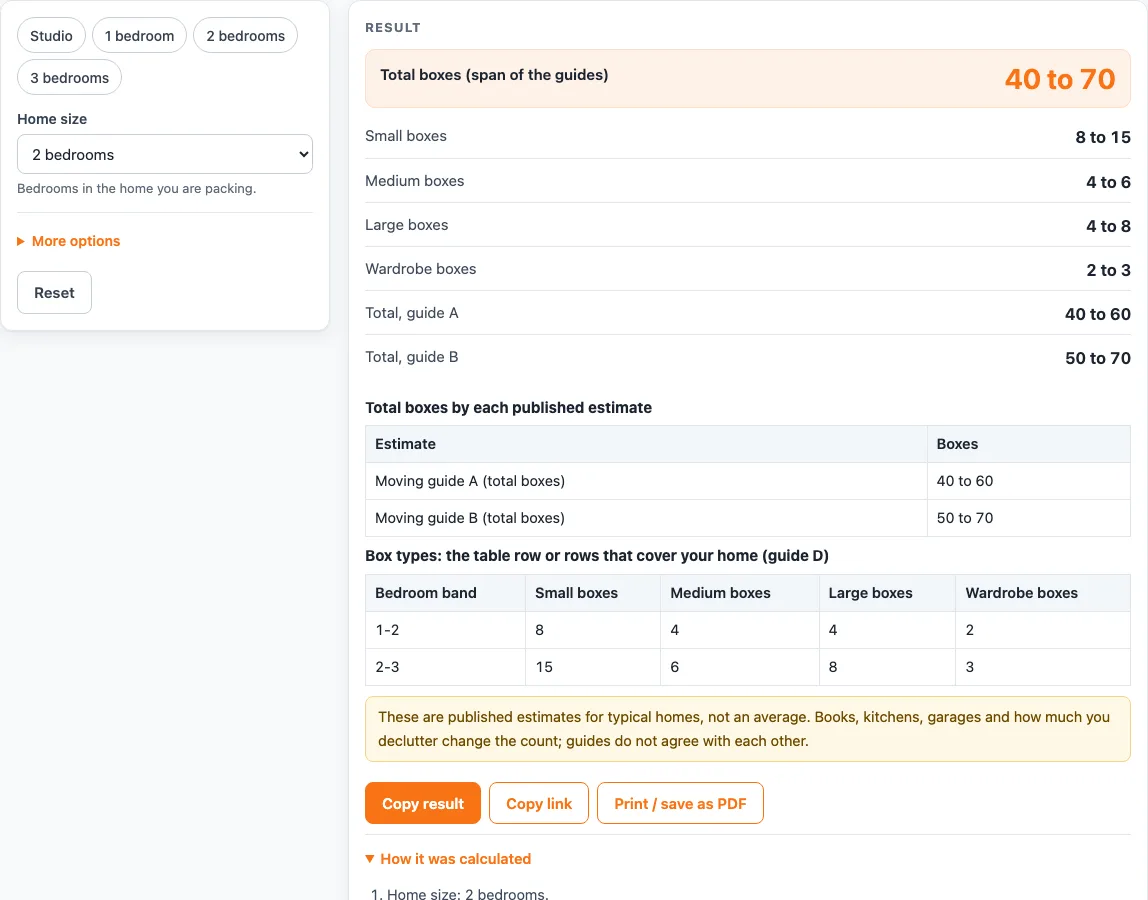
For example, 2 bedrooms gives 40 to 60 boxes in guide A and 50 to 70 in guide B, so the headline is 40 to 70 boxes. A studio gives 10 to 25, 3 bedrooms gives 60 to 100, and 4 bedrooms gives 80 to 150. For 5 or more bedrooms, guide A says 120 or more and guide B gives no figure, so the result is a minimum.
The two optional inputs use different rules. The rooms input uses a suggestion of 10 to 15 boxes per room, which guide A quotes from a retailer. Eight rooms gives 80 to 120 boxes. The living area input uses a rule of thumb from guide C: about one box per 10 square feet, rounded up. A 1,800 square foot home gives 180 boxes.
Why do box counts come as ranges instead of one number?
The box type counts come from the table in guide D, which has rows for 1 to 2, 2 to 3, 3 to 5 and 5 to 7 bedrooms. These bedroom bands overlap, so a home can fall into two rows. The calculator uses every row that contains the home and shows the result as a range.
A 2-bedroom home falls in the 1 to 2 and 2 to 3 rows, so it gets small 8 to 15, medium 4 to 6, large 4 to 8 and wardrobe 2 to 3. A 3-bedroom home gives small 15 to 20, medium 6 to 12, large 8 to 15 and wardrobe 3 to 6. A 4-bedroom home gives exactly 20 small, 12 medium, 15 large and 6 wardrobe boxes.
The table has no row for a studio, so no box type counts appear for one. It also has no counts for dish packs or extra-large boxes, so the calculator gives none. The guides do not fully agree, and other factors change the count: books, a large kitchen, garages, attics and how much a household declutters.
Sources (checked 15 October 2026): cubesmart.com · storagecafe.com · uhaul.com · publicstorage.com · aws.state.ak.us · hireahelper.com · hondanews.com · fromtheroad.ford.com · tsishipping.com · thumbtack.com · redfin.com · storagecafe.com
Worked examples
| Input | Result |
|---|---|
| 2 bedrooms | 40 to 70 boxes in total; small 8 to 15, medium 4 to 6, large 4 to 8 |
| Studio | 10 to 25 boxes in total |
| 3 bedrooms | 60 to 100 boxes in total; small 15 to 20, medium 6 to 12, large 8 to 15 |
| 4 bedrooms | 80 to 150 boxes in total; small 20, medium 12, large 15 |
| 6 bedrooms | 120 or more boxes in total; small 30, medium 18, large 25 |
Calculated by the tool above; open it with the same values to see each step.
Frequently asked questions
Is the moving box calculator free to use?
Yes. It is free, runs in your browser, and needs no sign-up. Nothing you enter is stored or uploaded.
How many moving boxes do I need for a studio?
Guide A gives 10 to 20 boxes for a studio and guide B gives 15 to 25, so the headline span is 10 to 25. The box-type table (guide D) has no studio row, so the calculator shows no box type counts for one.
Why does the calculator say 120 or more for 5 bedrooms?
Guide A gives 120 or more for 5 or more bedrooms, and guide B gives no figure for that size. The total is open-ended, so treat it as a minimum.
Does the calculator give counts for dish packs or extra-large boxes?
No. The box-type table (guide D) has no counts for dish packs or extra-large boxes, so the calculator does not show any.
What does the “living area” input add to the result?
It gives a separate estimate of about one box per 10 square feet, rounded up, from guide C. For example, 1,800 square feet gives 180 boxes.
Is the result an exact number of boxes?
No. The result is an estimate for ordinary homes. Books, a large kitchen, garages, attics and how much you declutter can change the count.
Related tools
- Moving Box Sizes: Use this when you want to compare the sizes of the box types before you buy.
- Storage Unit Sizes: Use this to see the common storage unit sizes if you need space for boxes after the move.
- What Size Storage Unit Do I Need?: Use this to match the number of boxes and furniture you have to a storage unit size.
- What Size Storage Unit for a Car?: Use this if you also need to store a vehicle during or after the move.
- How Big Is a 10x10 Storage Unit?: Use this to check how much room a 10x10 unit gives you.