Standard Window Sizes
Pick a window type to see its width and height range in inches and cm from four guides, side by side, then check your own window measurement.
Recent
Your last 10 settings, saved only in this browser. Nothing is uploaded.
This page lists standard window sizes for seven window types: single-hung, double-hung, sliding, casement, awning, picture and bay. It checks the width and height you enter against the size ranges published in four guides, and shows which window types your measurement fits. The tool runs in your browser, so you can use it right on this page.
The chart compares the figures from four published guides, which this page calls Source A, Source B, Source C and Source D. Each result shows the range for the window type you choose, in inches and centimeters. Press an example button first if you only want to see how it works.
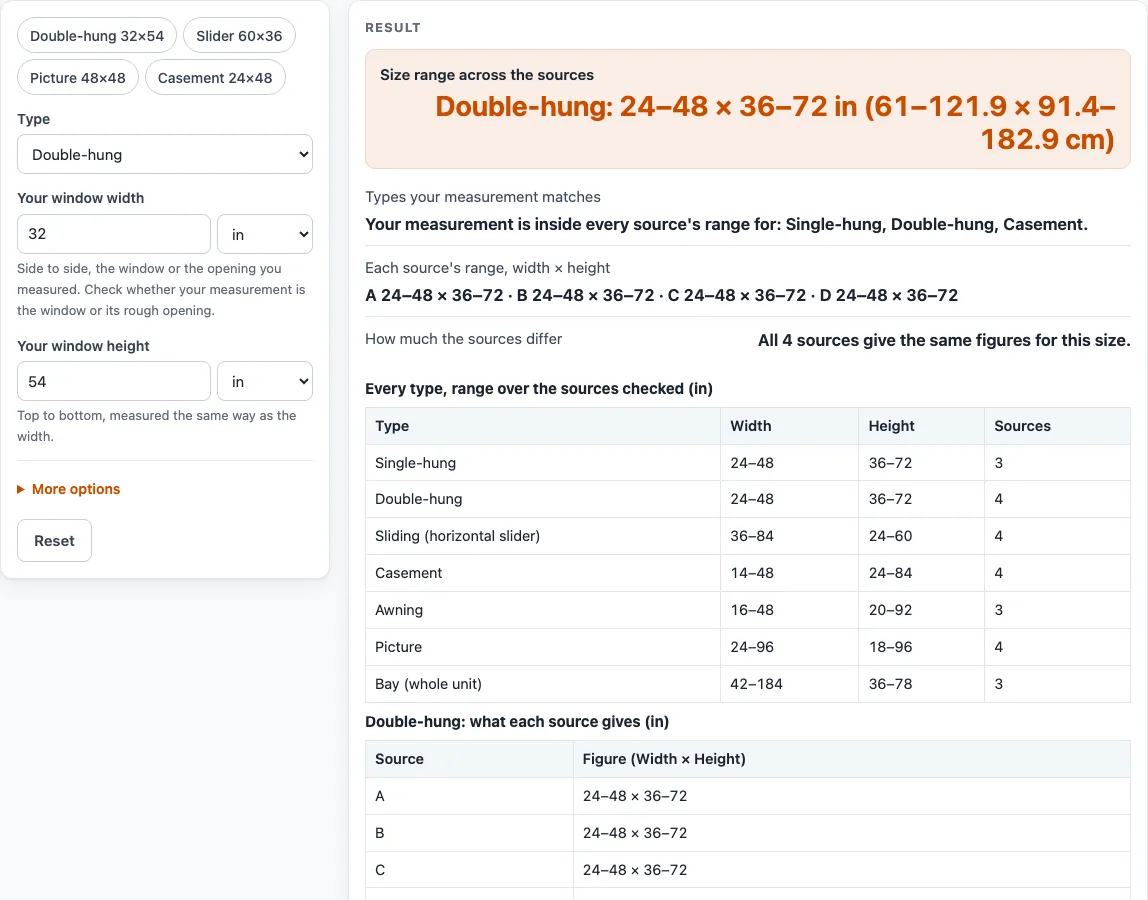
How to use the Standard Window Sizes chart
- Open the Type menu and choose your window type. The 7 choices are Single-hung, Double-hung, Sliding (horizontal slider), Casement, Awning, Picture and Bay (whole unit).
- Type the width of your space into Your window width.
- Pick the unit for that width (inches, feet, centimeters or meters) from the unit menu beside the field.
- Type the height of your space into Your window height, then pick its unit from the menu beside that field.
- Read the result line. It lists the window types whose range your measurement falls inside for every source; if there are none, it lists the types that match some sources.
- Read the size line below it. It shows the range for your chosen type, for example “Double-hung: 24–48 × 36–72 in (61–121.9 × 91.4–182.9 cm).”
- If you chose Bay, read the warning that appears, because the sources do not agree on what a bay unit is.
- To change the chart units, open More options and use the Show the chart in menu to choose inches (in) or centimeters (cm).
To try the tool without typing your own numbers, press one of the example buttons: “Double-hung 32×54”, “Slider 60×36”, “Picture 48×48” or “Casement 24×48”. Press Reset to return to the default settings.
What is the standard size of a double-hung window?
A standard double-hung window is 24 to 48 inches wide and 36 to 72 inches high, which is 61 to 121.9 cm wide and 91.4 to 182.9 cm high. All four sources give this same range, so it is the most consistent figure on the chart. The range is the lowest and highest figure any source gives, not a list of sizes that every maker builds.
The page builds each range from the sources in a specific way. It does not average them. For each window type, it takes the smallest and largest width and height that any source gives. Where a guide gives a list of sizes, such as 24, 28, 32, 40, 44 and 48 inches, the page uses only the lowest and highest values from that list. A range on the page therefore does not mean that every size in between is made.
The line “Each source’s range, width × height” and the table of the type you chose show each source’s own figures, so you can see where the guides differ. Your measurement is counted against each source separately, and it is allowed to be 0.5 inch outside a range to allow for rounding when you measure.
Is a window size the window or the rough opening?
The guides do not say whether a listed size is the finished window or the rough opening, the hole in the wall that the window fits into. Guide B says makers take 1/2 inch off the rough opening to get the window size. That is one source’s rule, and it does not settle the question for every maker.
For this reason, confirm with the maker before you order. Measure the opening you have, ask the maker whether the figure they quote is the rough opening or the finished window, and check the answer against your measurement before you buy.
Sources (checked 19 October 2026): windownation.com · hansons.com · miwindows.com · windowscanada.com
Worked examples
| Input | Result |
|---|---|
| Double-hung, space 32 in × 54 in | 3 type(s) fit or match every source |
| Sliding (horizontal slider), space 60 in × 36 in | 2 type(s) fit or match every source |
| Picture, space 4 ft × 4 ft | 3 type(s) fit or match every source |
| Casement, space 60 cm × 120 cm | 3 type(s) fit or match every source |
| Bay (whole unit), space 100 in × 60 in | 2 type(s) fit or match some sources |
Calculated by the tool above; open it with the same values to see each step.
Frequently asked questions
Do all window makers use the same sizes?
No. The four sources agree on the double-hung range, but they differ on other types. For example, the single-hung sources differ on width by 12 inches and on height by 6 inches. Check the exact sizes with the maker you plan to buy from.
How does the page check my window?
The page compares the width and height you enter with the lowest and highest figures from each source for the type you choose. It lists the types where your measurement falls inside every source’s range. If a source gives no width figure for a type, your height alone counts for that source. Guide B’s awning width looks like a misprint, so the page uses only its awning height.
Is anything I enter saved or sent anywhere?
No. The tool runs in your browser, and nothing you type is sent to a server or stored by the page.
Does a size inside the range mean a maker will build it?
Not always. The range shows the lowest and highest sizes that the sources give, and some guides give a list rather than a full range. Ask the maker whether they build the exact width and height you need.
Why does the bay row show two different figures?
The bay row mixes two ideas. Guides A and B give a whole-unit size from 42 to 126 inches wide. Guide D gives total widths of 126, 146 and 184 inches for a three-panel bay. The page shows both and warns you, because the sources do not agree on what a bay is. Check the size with the maker before you order.
Does this page tell me if a window meets a building code?
No. The page does not cover egress window rules, safety glass, energy ratings or prices, and it makes no claim that any size meets a building code. Check local rules and the maker’s specifications for those.
Related tools
- Laundry Room Dimensions: Find the smallest room that fits a washer, dryer and aisle.
- Washer and Dryer Dimensions: Compare washer and dryer sizes with the space you have.
- Refrigerator Dimensions: Check which refrigerator types fit an opening you measure.
- Dishwasher Dimensions: Check which dishwasher types fit a cabinet opening.
- Standard Cabinet Sizes: Look up standard cabinet heights, depths and widths.
- Pantry Dimensions: Plan the aisle and shelves of a pantry from published guides.